How to Get Hired in IT Before You Graduate
Plenty of university students in Cambodia assume they have to finish their bachelor’s degree before they can apply for a real job. In IT, people hiring for entry-level roles usually care most about whether you can do the work such as writing code that runs, can you work out a problem you haven’t seen before, or you actually built something. That is a portfolio of your projects and give an opportunity to apply your first IT job. If you’re studying IT, computer science, or a related field, you don’t have to wait for your final semester to start working. An internship or a part-time job will do it. You could graduate with a year or two of real experience behind you, which most of your classmates won’t have. The benefit of applying job before you graduate is
an IT role while studying enables you to:
- Earn income to support your education.
- Apply academic theory to real business environments.
- Understand corporate expectations and modern workflows.
- Build a professional network before entering the post-grad job market.
seven-steps to figure out in order to apply first IT job for university students
Choose Your IT Career Path
Trying to master every programming language, stack, and framework at once leads to burnout. Instead, focus on one specialization that aligns with your interests and local market demand. If you are finding your ability to answer and configure some devices or build something in IT. Please consider as below:
IT Assistant or IT Support
The first job that comes from your fundamental of IT is IT Assistant or IT support that you have an ability to installing/configuring software and operating systems, troubleshooting hardware, managing user access/permissions, and supporting local network devices. Some skills such as Window OS, CCTV, Microsoft Offices, Internet and Email, Google Apps, Configuring routers and switches, etc. If you have these kinds of skills, please consider applying for your first IT job.
Basic Web Design and Development
For students who passionate about in building web applications, responsive interfaces, content management system, UX and UI designing, etc. If you confident in HTML, CSS, JavaScript, WordPress or Git, please consider this position to be applied
Data Analytics
Analytical minds focused on extracting business insights from data such as cleaning datasets, building interactive dashboards, and reporting business trends to key stakeholders. This job is much more complicated but if you are confident of using Microsoft Excel or Spreadsheet include SQL or basic python, please consider.
Optimize Your Resume
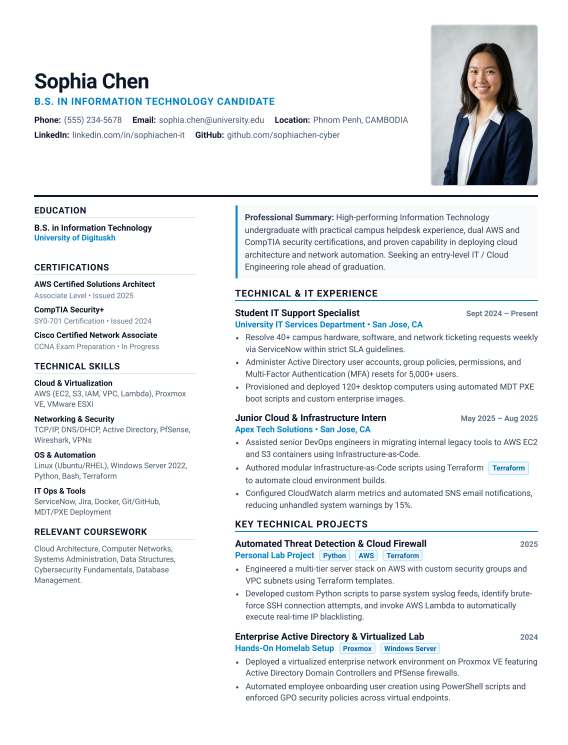
Your first IT job application needs a resume that’s easy to scan. You may not have work experience, but you can still show what you can do through your education, the tools you know, and projects you’ve built.
1. Write a Clear Professional Summary
Two or three sentences is plenty. Say you’re starting out in IT, what you’re drawn to (support, networking, web development, data), and the kind of role you want. “Computer science graduate looking for a junior help desk or systems role” beats a paragraph about being passionate about technology.
2. Highlight Relevant Technical Skills
List the languages, databases, operating systems, networking topics, and tools you’ve really used. Only include what you could talk about in an interview. If you list SQL, expect someone to ask you to write a query.
3. Showcase Academic Projects
This section carries a lot of weight when you have no job history. Pick your best two or three: a class website, a database for a course, an app you built with a team. For each, say what your part was, what you built it with, and what came out of it.
4. Include Education and Certifications
Put your degree and major first, then the coursework that fits the job. Add online certificates and training programs below that.
5. Add Internship and Volunteer Experience
Internships count, but so do freelance jobs, university clubs, and volunteer work like setting up computers for a local nonprofit. If it involved technology, it belongs here.
6. Keep Your Resume Professional
Use a plain layout, stick to one page if possible, and proofread it twice. Save it as a PDF so the formatting doesn’t shift when someone else opens it.
At the end of the day, Employers hiring for entry-level roles don’t expect experience. They want to see that you’ve built things, learned on your own, and can pick up new tools quickly. Make that easy to see.
Professional Resume Template as Example
There are six best recruitment and job websites in Cambodia which all of you should be considered as legal one, please visit our previous post 6 best recruitment and job websites in Cambodia – DigitusKH
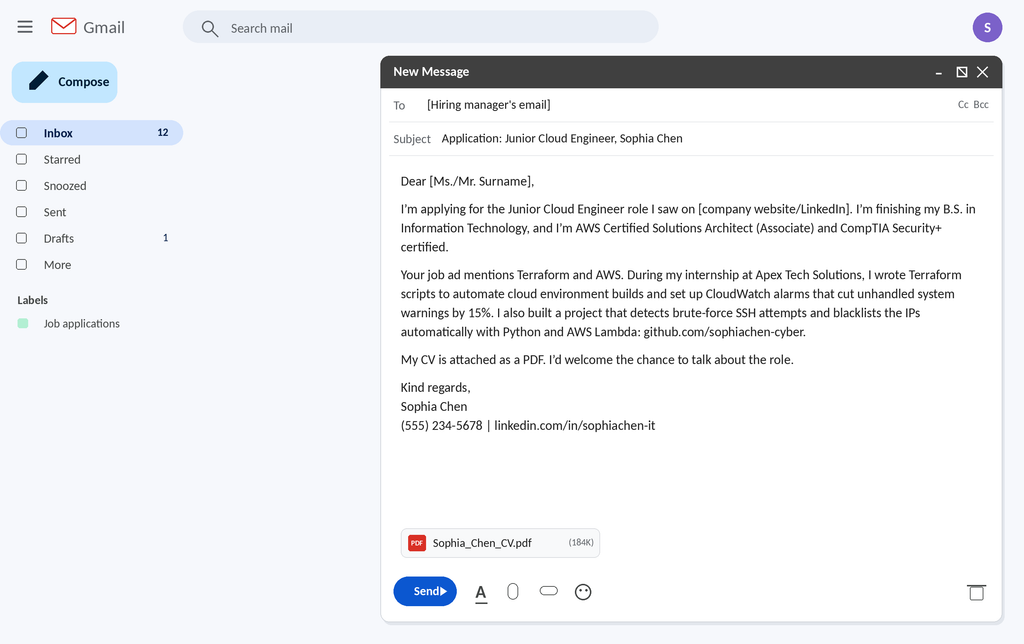
Learn how to use Email to apply for job
Application emails are simple, and the usual mistake is leaving one piece out. Here’s what to include, with an example for a different person.
- Subject line: the role and your name, so the email is easy to find. For example: “Application: Junior Network Technician, Dara Sok”.
- Greeting: the recruiter’s name if the posting gives one. If it doesn’t, “Dear Hiring Team” is fine.
- Opening line: which role you’re applying for and where you saw it.
- The pitch: two or three sentences tying your experience to what the job asks for.
- Attachment note: say what’s attached, like “My CV is attached as a PDF”.
- Close: a polite line about next steps, then your name, phone number, and LinkedIn link.
Here is the same structure using for CV as the above