How to Use AI to Work Faster, Create More Value, and Stay Ahead
Artificial intelligence (AI) is no longer just a technology trend. It is becoming a practical tool for how people research, communicate, analyze information, create content, solve problems, and run businesses. Most people ask it to write an email, summarize an article, or answer a quick question. That’s fine, and it does save time, but it’s also just the surface of what these tools can do. But there’s a real gap between using AI and using it well. Instead of asking “how can AI help me finish this,” try asking: how can I get more done with less repetitive busywork? Paired with your own judgment, expertise, and data, AI can become something closer to a personal productivity system than a chatbot. Here is the way of how to use AI to work faster, think better, automate repetitive work, create reusable assets, and build a long-term competitive advantage.
What Does AI Productivity Really Mean?
As your daily work, you normally spend three hours researching a topic, two hours writing it up, and another hour turning it into a presentation. Now, AI can assist you to organize the research, pull out the important pieces of your research, draft a first version, highlight what’s missingness, etc. Instead of six hours to get one deliverable, more of your time goes toward the parts that actually need a human’s judgment calls, decisions, the stuff that requires you to have been paying attention. AI doesn’t replace the thinking but take on more of the grunt work.
Stop Using AI Only as a Chatbot
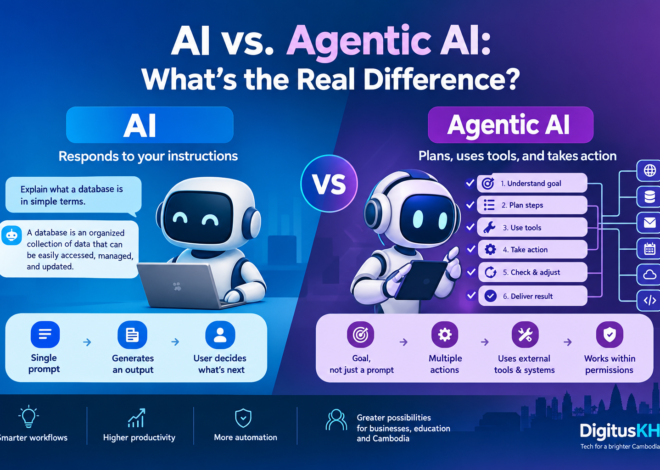
The most common mistake is typing something like “write an email” or “summarize this document” and expecting a great result. You’ll get an okay one. Generic prompts get generic output. The prompt consists of a role, context, an objective, constraints, and a sense of what the output should look like. For example, [Act as a senior digital transformation analyst. I’m preparing a government report on AI readiness. Analyze the information I provide, identify institutional gaps and risks, separate evidence from assumption, and produce an executive summary, key findings, recommendations, and an implementation roadmap.] The more relevant context you provide, the more useful the output can become.
Use the AI Productivity Workflow
A good AI workflow tends to follow six stages which is included collect, understand, generate, critique, improve, automate.
- Collect the raw material such as documents, reports, data, meeting notes, customer feedback, whatever’s relevant to your prompt
- Understand it by asking the model to pull out key points, trends, contradictions, and what’s missing.
- Generate a first draft, whether that’s a report, a proposal, an article, or a chunk of code.
- Critique it may ask what are the weak spots in this analysis? What assumptions aren’t backed up? What’s missing?
- Improve the draft using that feedback plus your own knowledge of the subject.
- Automate the process if you find yourself doing it over and over. This last step is where the real time savings show up.
Identify the Work AI Should Handle
You’ll probably find a pile of repetitive tasks hiding in your daily work such as routine to respond emails, meeting summaries, reformatting documents, building tables, drafting social posts, checking documents for consistency, converting information between formats, etc. The useful question isn’t “can AI do this faster.” It’s “should I even be doing this by hand.” That question is what surfaces real automation opportunities. The best workflows don’t just speed up repetitive work; They reduce or eliminate them.
Build Your Personal AI Knowledge System
AI gets a lot more useful once it has your own material to work with, instead of starting from zero every conversation. You can organize professional documents (reports, policies, templates, meeting notes), research material (papers, notes, references, frameworks), technical references relevant to your field, teaching material if you teach, and business material like market research or content ideas. Once that’s organized, you can build a system where your accumulated knowledge becomes reusable context.
Let AI Argue with You
AI is generating ideas but it arguable if it is differences from your concepts. Play around with what had asked in this argument, what am I assuming, what evidence would contradict this, what would a skeptical reviewer say, what am I missing? This is genuinely useful for research, strategy, project planning, and decision preparations. Do not automatically copy it, verify the important that claims yourself.
Speed up Research without Wrecking the Quality
Research spends much time. AI can help to make it shorter by starting with a clear question, find sources, pull the important material, compare sources against each other, look for where they agree and disagree, spot the gaps, then build your own analysis on top of that. It can summarize and compare well. For anything academic, legal, financial, or otherwise high stakes, check the important claims against primary sources yourself. The goal is faster research, not lower-quality research.
Move from Assistance to Automation
There’s a difference between asking AI something directly and building a workflow that runs on its own. Note a weekly tech-intelligence process by pulling recent developments, filters out the noise, highlight what’s actually significant, checks it against your field’s implications, summarizes it, and drops the output into your knowledge base. Instead of asking one AI system to perform everything, a workflow can divide the work automatically.
Think of it as a Ladder, not a Switch
The goal isn’t collecting tools but moving from one-off prompts toward something that keeps producing value without you re-doing the same work.
- Ask AI questions and get answers.
- Use it to help with individual tasks.
- Chain several AI-assisted steps into a workflow.
- Automate recurring processes so they need less manual input.
- Turn your knowledge into products: courses, templates, tools, reports.
- Build systems that continuously collect, analyze, and organize information on their own.
Twenty-five prompts worth stealing
- Planning
- Priorities: “Here are my tasks for today: [tasks]. Which are the highest-value ones, and what should I prioritize?“
- Time management: “Organize these tasks into a realistic schedule based on urgency, importance, and effort.“
- Delegation: “Look at these tasks and tell me which could be delegated to AI, automated, or need to stay manual.“
- Research
- Research assistant: “Help me research [topic]. What are the key questions I need answered, and what kinds of sources should I be looking for?“
- Compare sources: “Compare these sources and tell me where they agree, disagree, and where it’s unclear.“
- Research gaps: “Look at this literature and tell me where the gaps are.“
- Writing
- Report: “Turn these notes into a professional report. Keep the original facts intact and flag anything that’s an assumption.“
- Executive summary: “Condense this into an executive summary for senior decision-makers.”
- Editing: “Improve the clarity, structure, and grammar here without changing what it says.“
- Critical thinking
- Challenge me: “Critically evaluate this argument. What’s weak, what’s unsupported, what evidence is missing?“
- Alternative views: “Give me a few different interpretations of this situation and what supports each one.”
- Risk analysis: “What are the main risks in this proposal, and what would actually mitigate them?“
- Meetings
- Meeting prep: “Based on these documents, put together an agenda, key questions, and likely decision points.”
- Meeting summary: “Turn these notes into decisions, action items, owners, and deadlines.”
- Productivity
- Repetitive work: “Look at this workflow and tell me what could be standardized or automated.“
- Template creation: “Turn this document into a reusable template.“
- Process improvement: “Where can I cut steps out of this workflow?“
- Learning
- Teacher: “Explain [topic] like I’m new to it, then gradually make it harder.“
- Practice: “Give me exercises that test whether I actually understand this.“
- Feedback: “Look at my answer and tell me how to improve it.“
- Business
- Business ideas: “Based on my skills in [skills] and the problems [target market] deals with, what could I build?“
- Customer problems: “What are the biggest problems this audience has, ranked by urgency, without assuming a solution?“
- Product development: “Turn this idea into a basic product concept: users, problem, solution, features, pricing, and how I’d validate it.“
- Personal improvement
- Daily review: “Look at what I did today and tell me what to automate, delegate, improve, or drop.“
- AI strategy: “Based on my work, skills, and goals, give me five ways I could get more value from AI over the next six months.”
AI gives you leverage faster research, faster writing, faster learning, and more room to turn expertise into actual products. The advantage doesn’t come from the perfect prompt. It comes from rethinking how you approach the work in the first place. Start with one repetitive task. Improve it with AI. Turn that into a repeatable workflow. Automate the boring parts. Then ask whether what’s left over could become something reusable on its own.
Some Concerns You Should Know
A few things worth actually thinking about before you paste something in AI generated prompts such as
- Privacy. Customer records, employee data, unreleased financials, etc.
- Confidentiality and IP. Feeding a client’s contract or your company’s unreleased strategy into a public AI tool can violate an NDA or your own employment agreement.
- Bias. These models learn from existing text, and existing text carries existing biases: about gender, race, age, disability, whatever.
- Accountability. If AI drafts a report, a legal summary, or a piece of code and it’s wrong, that’s still your name on it. “The AI said so” isn’t a defense, professionally or otherwise.
- Consent and transparency. If you’re using AI to write on someone else’s behalf, generate content that will be published under a person’s name, or analyze someone’s data without them knowing, think about whether they’d be okay with that if you told them directly.
Before typing or copying, asking please making sure you the question worth asking and sharing. Does your data is confidentiality?