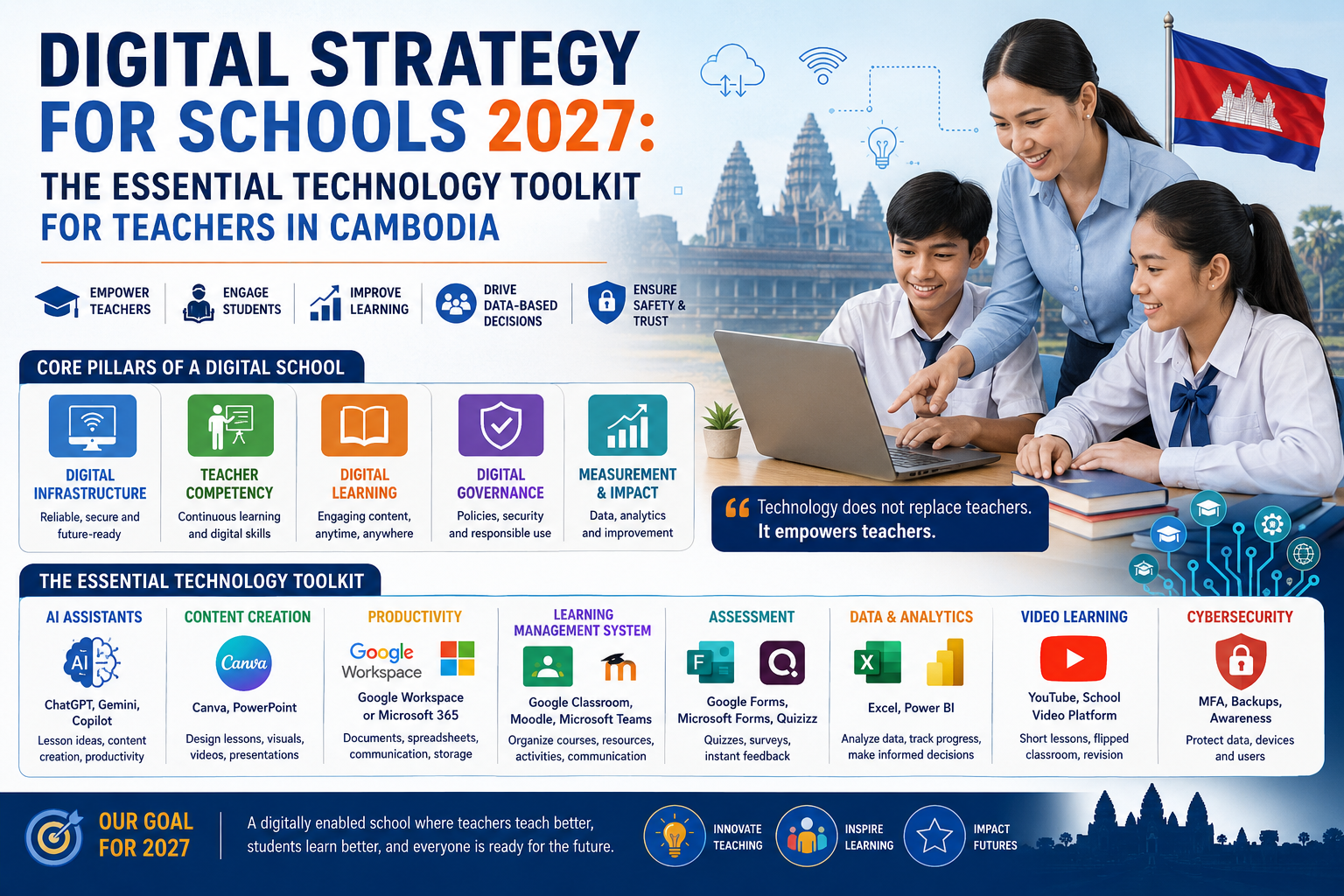
Digital Strategy for Schools 2027: The Essential Technology Toolkit for Teachers in Cambodia
Give it two more years and digital tools won’t be something a school bolts on top of “real” teaching. They’ll just be part of how a school runs: how lessons get planned, how attendance gets tracked, how a struggling student gets noticed before the term ends. The hard part for Cambodian schools was never buying computers or getting a faster internet line. It’s building something teachers will actually open on a Tuesday morning and use, that a small IT team can keep running without burning out. A school with a cabinet full of gadgets nobody touches aren’t ahead of a school running three tools well. It’s behind it. Cambodia has already started down this road through its national digital education initiatives. What’s left is mostly discipline: choosing skills, tools, and habits that fit the schools that actually exist here, not the ones in a glossy EdTech brochure.
What a Digital School Actually Looks Like
It doesn’t mean every lesson happens on a screen. Picture an ordinary lesson instead: the teacher drafts it with help from an AI assistant, builds a few slides in a design tool, drops the materials into an LMS, teaches the lesson, gives students a five-question check at the end, and glances at a dashboard afterward to see who got it and who didn’t. The teacher is still running the room; however, the tools just take some of the grunt work off their busy tasks. So, the rough formula is teacher, pedagogy, technology, and data, with AI layered on top. Not technology replacing the teacher. Technology freeing up the parts of teaching that were never the interesting parts anyway.
AI as a Teacher’s Assistant
This is probably the biggest shift between now and 2027. ChatGPT, Gemini, Copilot, whatever a school settles on, these tools can genuinely help with the unglamorous half of teaching: drafting lesson plans, writing quiz questions, building rubrics, coming up with discussion prompts, generating differentiated activities for the kids who need something easier or harder. For a teacher buried under prep work, that’s real time back. But here’s the catch teachers can’t skip: AI gets things wrong. Confidently. It makes up facts, repeats outdated information, and occasionally produces something that just isn’t appropriate for a classroom. So the workflow has to be: ask AI, check it, verify it, adjust it, then teach it. The teacher stays the one accountable for what ends up in front of students. That’s not optional, and it’s exactly the kind of judgment Cambodia’s teacher-training push around ICT and AI needs to build.
Canva and Visual Content
A wall of text is hard for a lot of students to get through. A diagram, a timeline, or a decently laid-out slide often does more work than three paragraphs of explanation. Canva (or something like it) lets teachers put together slides, worksheets, posters, certificates, infographics, short videos, and classroom announcements without needing any design training. Nobody’s asking teachers to become designers. A school can just build one template, logo, colours, fonts, done, and let every teacher start from that instead of a blank page each time.
Google Workspace vs. Microsoft 365
Every school eventually has to pick a lane here. Google gives you Docs, Sheets, Slides, Forms, Drive, Meet, and Classroom. Microsoft gives you Word, Excel, PowerPoint, OneDrive, Teams, Forms, OneNote, and Copilot. Both work fine. The question isn’t which one is objectively better, its which one your school can actually train staff on, secure, and support when something breaks. Sticking to one ecosystem also just saves everyone from relearning login screens and file formats every semester.
Learning Management Systems Are Getting Harder to Skip
An LMS is really just one place to put things instead of five. Course notes, videos, activities, assignments, quizzes, feedback, progress, all in one spot instead of scattered across Telegram groups and email threads. Moodle, Google Classroom, and Microsoft Teams each cover different pieces of this. For Cambodian schools specifically, an LMS matters because it gives students access to material outside the classroom walls, which opens the door to blended and flipped-classroom teaching without needing a lab full of new hardware.
Digital Assessment
This doesn’t mean turning every exam into an online test. It means using quick digital checks, five questions after a lesson, to see instantly which concepts landed and which didn’t, and which students need a follow-up conversation. Google Forms, Microsoft Forms, and Quizizz all handle this well enough. Schools can move at their own pace here: start with paper, add digital forms, then online quizzes, then LMS-based assessment, then start looking at the analytics once there’s actually data worth analyzing. No need to jump straight to the last step.
Short Videos, Not Lecture Recordings
Nobody needs a polished thirty-minute lecture video. A five-minute clip explaining one specific thing, what a pivot table does, how SQL’s SELECT works, why supply and demand move the way they do, is more useful and far easier to make. Pair that with a flipped-classroom rhythm: watch it before or after class, then use classroom time for discussion and actual problem-solving instead of one-way delivery.
Excel, Power BI, and Learning Analytics
With all the noise around AI, it’s easy to forget that plain old spreadsheet skills still carry most of the weight in a school office. Grades, attendance, student records, assignment tracking, results, all of it usually lives in Excel, and a teacher who’s comfortable with formulas and pivot tables can pull insights out of that data without needing a new system at all. For a lot of Cambodian schools, better Excel skills across the staff will move the needle faster than any shiny new platform. Power BI and Learning Analytics is working around with enough digital data, and it becomes powerful with dashboards such as enrolment trends, attendance patterns, exam results, subject-level performance.
Cybersecurity Isn’t Optional Once You’ve Gone Digital
The more a school relies on digital tools, the more it’s holding student records, family contact details, staff data, all of it worth protecting. The basics matter more than anything fancy: strong passwords, multi-factor authentication, regular updates, secured Wi-Fi, antivirus, backups, access controls, and a plan for what to do if something goes wrong. Teachers should know the STOP habit before opening anything unexpected:
- Stop — don’t click right away.
- Think — was I expecting this?
- Observe — check the sender, the filename, the extension.
- Prove — confirm with the sender through a different channel before opening anything.
Going digital without thinking about security just trades old risks for new ones.
Basic Skills Before Tools Can Be Implemented
Handing a teacher a new app doesn’t make them digitally capable. Training needs to build up in stages, not all at once:
- Basic skills — computer fundamentals, email, cloud storage, word processing, basic spreadsheets.
- Digital teaching — using an LMS, finding and organizing digital resources, running online assessments, using video, collaborating digitally.
- Advanced skills — data analysis, dashboards, content creation, learning analytics.
- AI-enabled teaching — prompting well, using AI for lesson planning and assessment, verifying AI output, understanding AI ethics, and teaching students to think critically about AI themselves.
AI Policy For Schools Is Matter Right Now
AI raises questions schools haven’t had to answer before.
- Can students use it on assignments?
- Can teachers use it to write exams?
- What counts as acceptable help versus cheating?
- What student information is safe to type into a chatbot?
- Who checks that AI-written material isn’t wrong or biased before it reaches a classroom?
- A school needs a written policy that spells out what’s allowed, what’s restricted, and what’s flatly prohibited, and it needs to teach students not just how to use AI, but how to question what it gives them.
To successfully adopt digital learning in Cambodia, strategies must prioritize local context, low-friction tools, and practical constraints over complex foreign models.
- Contextualize to Local Realities: Build for rural connectivity gaps, tight budgets, and Khmer language support instead of copying high-resource models from abroad.
- Support Mixed Hardware: Ensure platforms work reliably across low-spec, diverse, or shared student and school devices.
- Prioritize Daily Usability: Choose simple, intuitive tools that teachers can easily open and use every day over feature-heavy, complicated software.
- Bridge Digital Literacy Gaps: Account for varying tech skills among teachers, students, and parents with accessible, low-barrier technical support.
A Basic Practical Strategy, Built on Five Pillars
To establish a low-friction, sustainable digital learning environment adapted to rural bandwidth constraints, mixed device ownership, and varying levels of digital literacy across primary and secondary schools. A basic practical strategy which can be focused on five pillars as below:
- Infrastructure: reliable internet, Wi-Fi, teacher and student devices, backups, and someone who can fix things when they break.
- Teacher competency: structured training from basic literacy up through AI-enabled teaching.
- Digital learning: LMS, digital materials, online assessment, video, and AI-assisted teaching.
- Governance: clear policy on cybersecurity, privacy, AI use, copyright, and data handling.
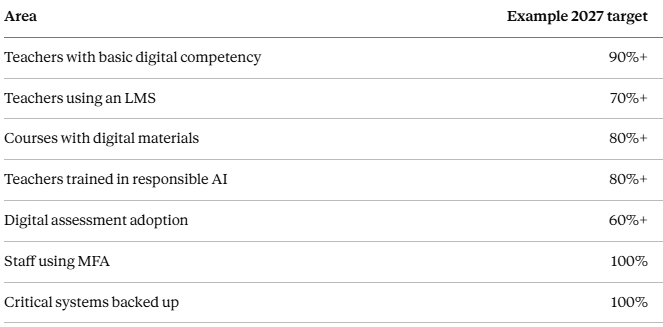
- Measurement: a small set of numbers worth tracking, adjusted to where each school is actually starting from:
The Toolkit Doesn’t Need to Be Long
- AI: ChatGPT, Gemini, or Copilot, for planning and drafting.
- Content: Canva or PowerPoint, for visuals.
- Productivity: Google Workspace or Microsoft 365, pick one or both as convenience
- LMS: Moodle, Google Classroom, or Microsoft Teams.
- Assessment: Google Forms, Microsoft Forms, or Quizizz.
- Data: Excel and, later, Power BI.
- Video: YouTube or whatever’s already built into the LMS.
- Security: MFA, endpoint protection, backups, and basic staff awareness.
That’s the whole list. Using every tool available isn’t the goal, having a small set that actually works together is.
Where to Start
Don’t wait for January 2027.
- Assess what’s actually true right now: teacher skills, infrastructure, connectivity, existing software, device access, security gaps, support capacity.
- Pick the five problems that matter most. Not twenty.
- Pilot with a small group of teachers before rolling anything out wider.
- Train based on what that pilot actually needed, not a generic curriculum.
- Scale the parts that worked.
The Point Isn’t More Technology
A school’s digital progress shouldn’t be measured by how many apps or AI subscriptions it’s paying for. It should be measured by whether any of it makes teaching, learning, or running the school noticeably easier. That means helping teachers save time, understand their students better, build better materials, assess more accurately, and communicate with less friction, while giving students the digital skills they’ll actually need later. The schools that come out ahead by 2027 probably won’t be the ones with the most tools. They’ll be the ones with a clear plan, teachers who were actually trained rather than just handed logins, and a habit of checking whether any of it is working.
The goal was never “digital schools.” It’s just better schools, with digital tools doing some of the heavy lifting.
Technology will keep changing faster than any policy document can keep up with. Teachers and students won’t. So, the order that actually holds up is people first, teaching second, technology wherever it genuinely helps.