What Is a VPN? How It Works, Types, & Pros and Cons
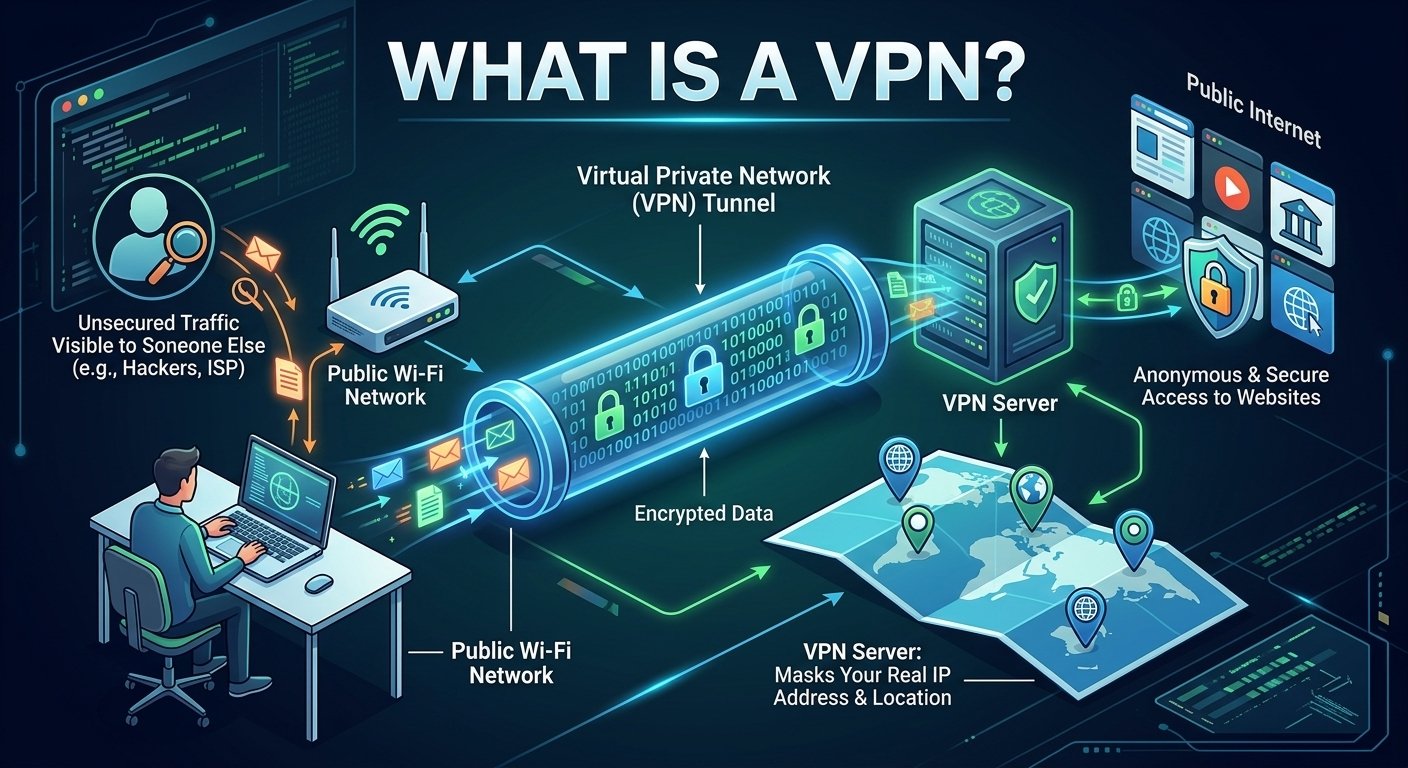
A VPN encrypts the connection between your device and a server the VPN company runs, then sends your traffic through that server before it hits the open internet. People reach for one to keep public Wi-Fi from being a free-for-all, to get into work systems from home, or just to knock their IP address out of the picture. It’s not a cloak of invisibility, though, and treating it like one is where people get into trouble. Under the hood, normally your device talks straight to your ISP, which passes your request along to whatever site you’re visiting. Add a VPN and your device talks to the VPN server first, over an encrypted connection, and the site sees the server’s IP address instead of yours. Sit down at a café and open your laptop on the house Wi-Fi, and anyone else on that network could potentially snoop on unencrypted traffic. Turn on the VPN and that connection to the server is encrypted, so snooping gets a lot harder. Companies rely on the same tunnel to let remote employees reach internal systems.
How It Works
The downsides are just as real. Everything now has to go through an extra hop and get encrypted and decrypted, so speed suffers, more or less depending on server distance, protocol, and your own connection to begin with. You’re also handing some of the trust you used to place in your ISP over to whoever runs the VPN, so their logging policy and track record matter; a provider that just slaps “100% anonymous, no logs” on its homepage without backing it up should make you suspicious, not confident. Free services deserve extra scrutiny too, since servers cost money somewhere, and some providers make it back through ads or your data. None of this touches phishing, malware, or bad passwords, either. If a fake login page fools you, the VPN isn’t going to stop your fingers from typing your password into it.
To summarize this scenario:
- Data Scrambling: When you connect, the VPN software encrypts your data payload before it leaves your device.
- Secure Tunneling: The encrypted traffic travels through a secure connection to a server operated by the VPN provider.
- IP Address Masking: The VPN server decrypts your traffic and routes it to your target website, which sees the server’s location and IP address rather than yours.
People sometimes mix up VPNs and proxies. A proxy typically reroutes one app or one kind of traffic. A VPN wraps the whole connection.
Primary Types of VPNs
- Personal / Mobile VPNs: Designed for individual consumers to secure public Wi-Fi, bypass geo-blocking, and maintain general online privacy.
- Remote Access VPNs: Allow individual employees to securely connect to a corporate network from anywhere, accessing internal files as if physically in the office.
- Site-to-Site VPNs: Combine two or more entire networks (such as a corporate headquarters and a regional branch office) into one unified private network.
The reasons to use one look the same as anywhere else: students on university Wi-Fi, employees connecting to head office, companies linking branches together. It just shouldn’t be the only thing standing between an organization and a bad day. MFA, endpoint protection, and training staff not to click on garbage still matter more than people give them credit for. The short version: a VPN encrypts your connection and hides your IP address from the sites you visit. That’s genuinely useful. It’s not the same as being anonymous, and it doesn’t replace strong passwords, MFA, or just paying attention.
Pros vs. Cons
| Benefits (Pros) | Limitations (Cons) |
| Data Privacy: Shield activity from ISPs, network admins, and snoops. | Speed Drop: Encryption overhead and distance to servers can reduce internet speed. |
| Public Wi-Fi Security: Prevents man-in-the-middle attacks on open networks. | Subscription Cost: Quality providers charge a monthly or annual fee. |
| Bypass Restrictions: Access region-locked content and streaming libraries. | Not Total Immunity: Does not block malware, phishing, or bad browsing habits. |
| Avoid Throttling: Prevents ISPs from slowing down specific traffic types. | Website Blocks: Some services actively block connections coming from VPN IPs. |
Free VPNs Can Be Considered but Not Recommends
| Provider | Data Limit | Best Feature | Major Trade-off |
| Proton VPN Free | Unlimited | Zero ads, no data caps, Swiss privacy protection | 1 device, auto-assigned server locations, no streaming/P2P |
| PrivadoVPN Free | 10 GB / month | Fast speeds, supports streaming and torrenting | 10 GB monthly data cap, 1 device |
| Windscribe Free | 10–15 GB / month | Built-in ad blocker, unblocks streaming platforms | Strict monthly data cap |
| Hide.me Free | Unlimited | Unlimited data usage, strong privacy features | Slower speeds, 1 device limit |
Think To Consider Before Using Free VPN
A free VPN is not recommended for privacy-conscious users. Some issue can be addressed such as (1). Unclear Ownership: The developers operating these apps lack corporate transparency, making it difficult to verify who actually handles your internet traffic or where the company is legally based, (2). Ad-Tracking Monetization: Because the service is free, the app integrates third-party ad SDKs (such as Google Mobile Ads) that collect device identifiers, general location, and performance metrics to serve targeted ads, (3). Slow Speeds: Server capacity is limited, frequently leading to bandwidth throttling, lag, and poor video playback, and (4). No Independent Audits: Unlike reputable privacy services.