The IT Shadow: The Hidden World Behind Your Organization
Most people hear “Shadow IT” and picture something criminal. Hackers, stolen passwords, secret backdoors. The reality is a lot more boring, and a lot more common: it’s your coworker uploading a spreadsheet to their personal Dropbox because the file was too big for email. Small decisions like that pile up into real risk.
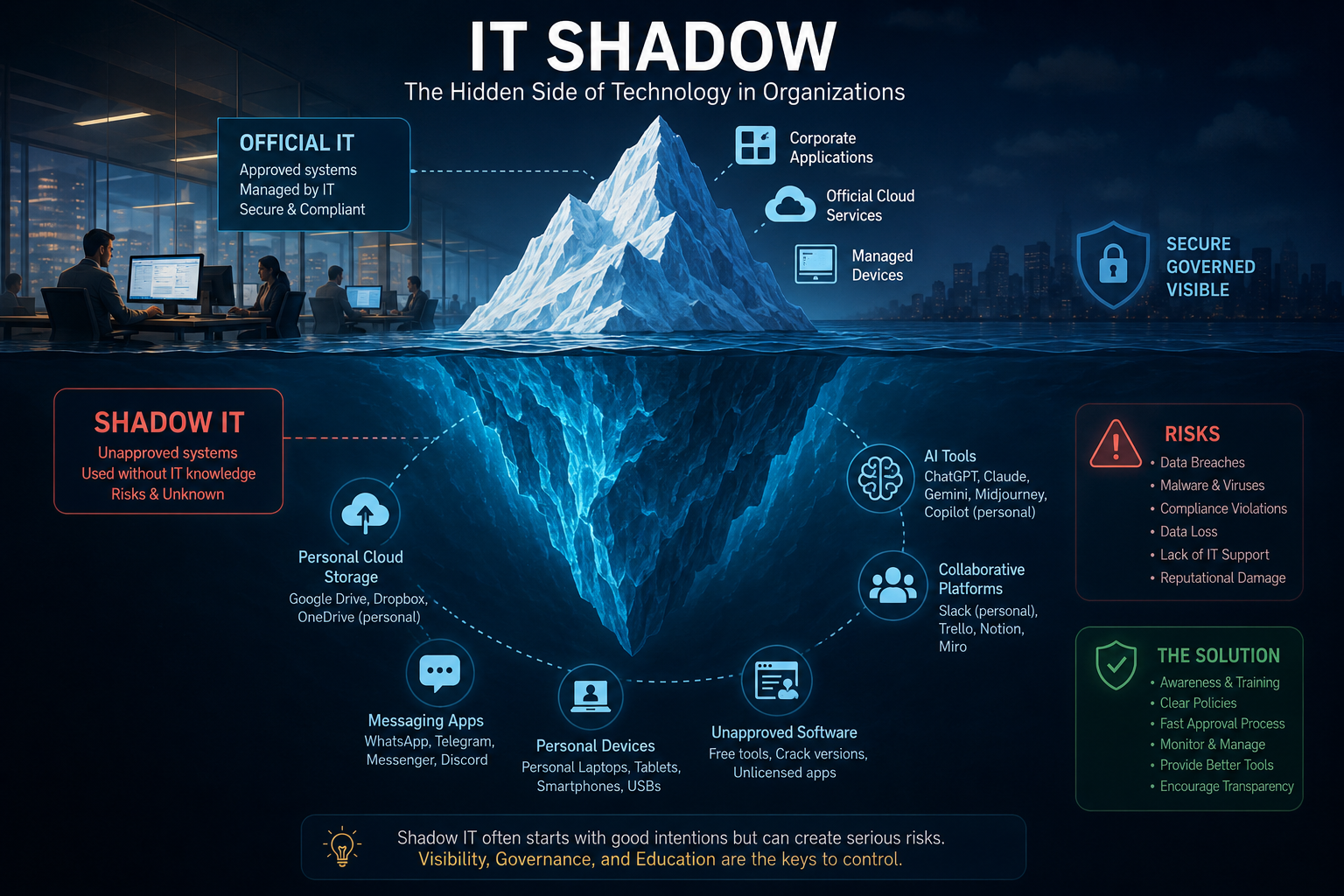
Picture an iceberg. The part above water is the software and hardware your IT department actually approved. Everything below the surface, the apps, devices, and cloud accounts nobody signed off on, is Shadow IT.
What is it, exactly?
Shadow IT is any tool, app, device, or service employees use for work without IT’s knowledge or approval.
Say the company email caps attachments at 25 MB, and someone needs to send a 5 GB file. They’re not going to file a ticket and wait three days. They’ll drop it in a personal Google Drive account and move on with their day. Nobody at IT knows where that file now lives, who can open it, or whether it’s protected at all. The employee didn’t mean to cause a problem. They just wanted the file sent.
Why it happens
Policy moves slower than the software market. That’s really the whole story.
Getting new tools approved often means clearing several departments, a security review, and a budget sign-off, sometimes over weeks. Meanwhile a free alternative is one search and a five-minute install away, so people take it. Remote work made this worse too: personal laptops, home Wi-Fi, and browser-based apps are now baked into how a lot of people work, approved or not. And plenty of employees genuinely don’t realize using that tool crosses a line, because nobody told them where the line was.
The forms it takes
Unauthorized software. Personal copies of Office, free PDF editors, screen recorders, AI writing tools. A marketing employee, for instance, might buy Canva Pro out of pocket because the company never licensed it.
Cloud storage. This is probably the most common one. Google Drive, Dropbox, personal OneDrive, WeTransfer. A finance employee moving payroll spreadsheets into a personal Dropbox account so they can finish the work at home is a textbook case, and also a genuinely bad idea, since salary data is now sitting somewhere nobody at the company can see.
Messaging apps. WhatsApp, Telegram, Discord, a Slack workspace someone spun up without asking. A team might switch to Telegram because it feels quicker than Teams, and it probably is. But now the project history lives outside every company system, and good luck finding it later.
Personal devices. An employee editing customer records on a laptop with no encryption and no antivirus is one theft away from a data breach. It happens more than you’d think.
AI tools. This is the newest and fastest-growing category. ChatGPT, Claude, Gemini, Midjourney. A lawyer pasting a confidential contract into a chatbot to get a quick summary might not think twice about it, but if company policy bans uploading client material to outside AI services, that’s now “Shadow AI,” a subset of the same problem.
It’s not all bad
Here’s the part people skip: a lot of good tools entered companies through the back door first. Zoom is the obvious example. Employees started using it informally during the shift to remote work, long before most IT departments had officially blessed it, and eventually the official policy just caught up to what people were already doing.
That’s the upside of Shadow IT in a nutshell. People get work done faster because they’re not waiting on a ticket. Teams adapt to new problems in hours instead of months. And workers tend to be happier using tools that actually fit how they work, which shows up in the quality of what they produce.
And the real risks
None of that cancels out the downside.
Sensitive data ends up in places nobody’s securing. A customer database saved to someone’s personal cloud account is one bad password away from being public. Free tools downloaded from a random site sometimes come bundled with malware, and “free PDF converter” is a classic vector for ransomware, sometimes locking up an entire network within minutes of installation.
Regulated industries have it worse. Healthcare, banking, government, education: all of these carry legal requirements around where data lives and who can touch it, and an unapproved tool can blow through those requirements without anyone noticing until an audit.
There’s also the quieter problem of data just disappearing. A salesperson leaves the company, and it turns out every proposal from the last three years was sitting in their personal Google Drive, not the company’s. Nobody thought to ask before they left. Now it’s gone.
And when something breaks, IT often can’t help, because they never knew the tool existed in the first place.
What this looks like in practice
A marketing team stuck with outdated design software starts using Canva on personal accounts. Productivity goes up. But so does the mess: brand assets scattered across a dozen individual logins, and when one designer leaves, hundreds of files leave with them.
A sales team abandons the CRM for WhatsApp because customers get faster replies that way. True, but when a rep changes accounts, the entire conversation history is gone, and the next person starts from zero.
HR uploads employee contracts to a personal Google Drive. Fine, until one of those Google accounts gets phished, and suddenly thousands of employee records are out in the wild.
Developers sign up for an AI coding assistant on personal accounts to move faster. It works. It also means proprietary source code is now sitting on someone else’s servers, possibly in direct violation of the company’s own security policy.
Managing it (because eliminating it isn’t realistic)
Banning tools outright tends to just push the behavior further out of sight. What actually works is closer to this:
- Give people modern tools so there’s less reason to go looking elsewhere
- Make the approval process for new software fast enough that waiting isn’t the worse option
- Teach people what the actual risks are, plainly, not as a compliance checkbox
- Keep an eye on network activity so unapproved tools don’t stay invisible
- Make it easy for someone to say “hey, we should use this” instead of quietly adopting it
- Write clear, specific policy on cloud storage, personal devices, and AI tools
- Review new tools regularly instead of only reacting when something goes wrong
One more distinction worth making
Shadow IT is not the same thing as cybercrime, and it’s worth being clear about that. A cybercriminal wants to steal or damage something. An employee using an unapproved app almost always just wants to finish their work faster. The risk isn’t in their intent. It’s in the fact that nobody’s watching what they’re doing with company data.
Where this is headed
Cloud tools, remote work, and AI aren’t going anywhere, so neither is Shadow IT. Companies that respond by locking everything down usually just teach employees to hide their workarounds better. The ones that actually get ahead of it tend to ask a different question: why are people reaching for this tool in the first place, and can we give them something just as good, but sanctioned?
That’s really the whole job now: not stamping out unauthorized tools, but understanding why they keep showing up, and building official alternatives good enough that people don’t feel the need to go around them.
Bottom line
Shadow IT is what happens underneath the official technology stack, mostly driven by people trying to get their jobs done, not by anyone trying to cause harm. It can genuinely speed things up and surface tools worth adopting officially. It can also lead to data breaches, compliance failures, malware, and files that vanish the moment someone quits.
The organizations that handle it well don’t treat it as a problem to stamp out. They treat it as a signal: employees are telling you, through their own workarounds, exactly where the official tools are falling short.